Circle Packing Art for Pen Plotters
Circle packing produces dense, organic fills that look impossibly complex to draw by hand — but a plotter handles them effortlessly. Learn the algorithm and how to plot it.
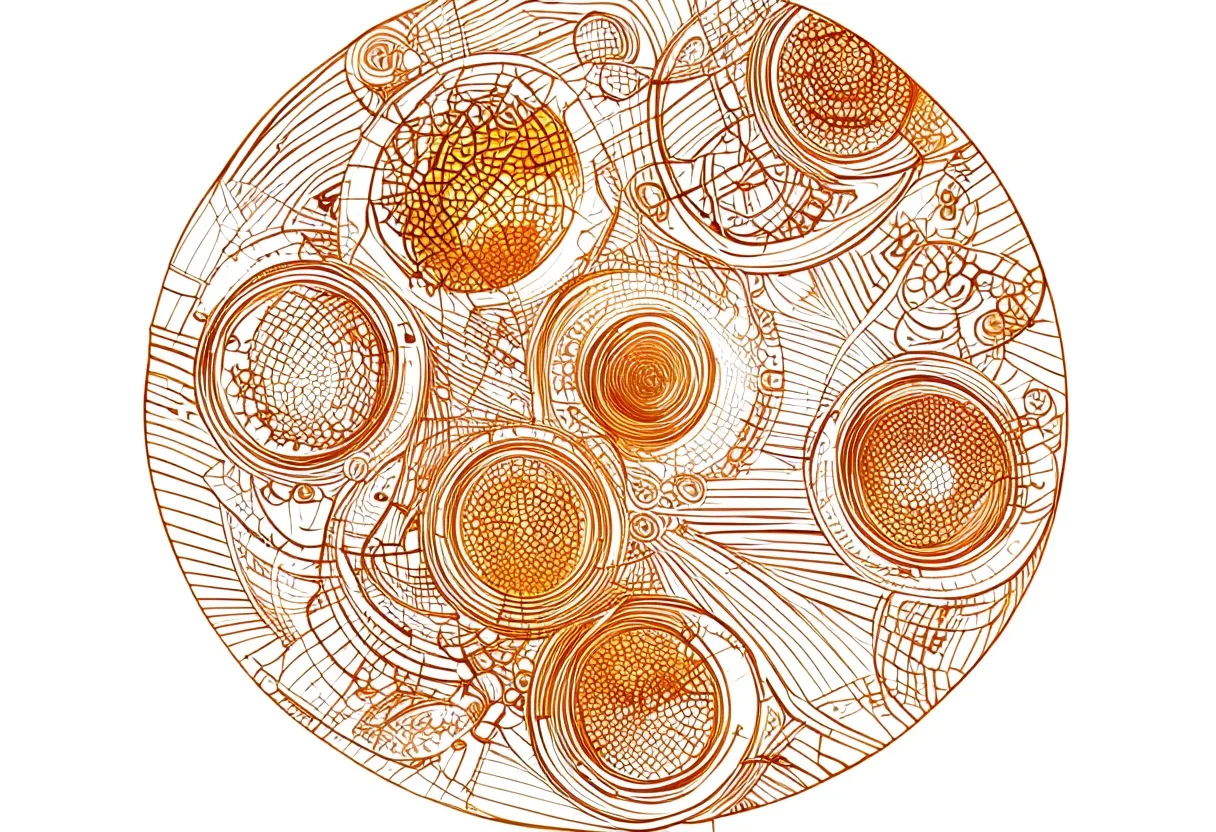
Of all the generative techniques that shine when plotted, circle packing might produce the most immediate wow. Circles grow from seeds, push against each other, and fill a space in a way that looks organic and intricate — yet plots perfectly cleanly because every element is a simple curve. Here’s how it works and how to make your own.
The algorithm in plain language
- Pick a random point on the canvas
- Grow a circle from that point
- Stop growing when the circle would overlap an existing circle or hit the boundary
- Repeat with a new random seed point
Run this thousands of times and you get a dense mosaic of tangent circles, no overlaps, no gaps bigger than a minimum circle size. The result looks complex but is generated by a loop any beginner can code.
Making it yours
The interesting variables are:
Minimum and maximum circle size — a wide range gives hierarchy (huge circles with tiny circles nestled in the gaps); a narrow range gives a more uniform, tile-like texture.
Boundary shape — circles can pack inside a rectangle, a circle, or any SVG shape. Packing inside letters or silhouettes is a popular technique.
Growth rate and iteration count — faster growth and fewer iterations means fewer circles and a sparser look. More iterations fills gaps with smaller and smaller circles.
Weighting by image — the most striking results map circle density to an input photo: faces, where fine circles concentrate on dark areas, look photorealistic in dense plots.
Coding it in p5.js
A basic circle packer in p5.js takes about 50 lines. The core data structure is just an array of {x, y, r} objects. On each frame, pick a random point, check it against every existing circle using dist(x1, y1, x2, y2) > r1 + r2, and if no collision, add a circle and grow it.
Search for “p5.js circle packing” — there are dozens of well-documented sketches you can remix. Export with p5.svg to get a vector file your plotter can use directly.
DrawingBotV3 shortcut
If you don’t want to code, DrawingBotV3 has a circle-packing distribution built in. Load an image, select the circle packing mode, and it generates an SVG in minutes. It won’t give you the same control as writing your own, but it’s a fast way to explore the aesthetic.
Optimizing for the plotter
A circle-packed SVG with thousands of paths can be slow and inefficient to plot raw — the machine lifts, moves, and lowers for every single circle. Run the output through vpype to reorder paths by travel distance:
vpype read packed.svg reorder write plot.svgThis alone can cut plot time by 30–50% on dense designs.
Pen choice
Circle packing plots beautifully with any good fineliner. Sakura Pigma Micron 0.3 mm gives fine, crisp circles; 0.5 mm reads bolder. On smooth paper, the curves are clean enough that adjacent circles look printed.
For a different aesthetic, try a single-colour plot with circles plotted as spiral fills instead of outlines. This takes far longer to plot but produces a visually richer, hand-drawn look — each circle is a wound spiral of lines rather than a ring.
A first project
Start simple: pack circles into a square, minimum size 10 mm, maximum 40 mm, with a moderate iteration count. Plot it with a 0.3 mm fineliner on smooth white paper. The first result will already look good — circle packing is forgiving. Once that works, try packing into a silhouette or mapping density to a high-contrast photo.
Frequently asked questions
What is circle packing in generative art?
Circle packing is a technique where circles grow from random seed points, expanding until they touch their neighbors or a boundary. The result is a dense mosaic of touching circles that tile a shape, image, or the entire canvas.
Is circle packing hard to code?
The basic algorithm is beginner-friendly: seed a random point, grow a circle until it collides, repeat. A working sketch in p5.js takes around 50 lines. Image-driven versions (where density follows a photo) take a little more setup but are well documented.
How long does a circle packing plot take?
It depends on circle count. A few hundred large circles plots in under ten minutes. Dense packing with thousands of small circles — especially if each circle is plotted as a stroke spiral — can take hours. Start sparse.
Gear mentioned in this post
Antoine Beyeler vpype (Free)
4.9 (480)The command-line Swiss-army knife for pen plotter SVGs — optimizes, reorders, merges, crops and prepares vector files for cleaner, faster plots.
Best for: Everyone — mandatory step between generative art and plotting
DrawingBotV3 DrawingBotV3 (Free)
4.6 (320)Free, open-source software that turns photos into plottable line art — sketch, stipple and hatch styles that export clean SVGs for your plotter.
Best for: Converting photos into plottable sketches and stipple art
Daniel Shiffman The Nature of Code
4.8 (900)The book that teaches the generative-systems thinking behind great plotter art — flow fields, forces, noise and autonomous agents, all in approachable code.
Best for: Learning to generate art worth plotting
Sakura Pigma Micron Fineliner Set
4.8 (5,400)Archival pigment fineliners that are the de facto default for pen plotting — consistent line width, fade-proof ink and almost no skipping.
Best for: Clean, consistent line art on most papers