Single-Line Fonts for Pen Plotting: Why They Matter
Regular fonts plot as hollow outlines. Single-line (Hershey) fonts draw text as true strokes. Here's how to find, use, and plot single-line fonts cleanly.
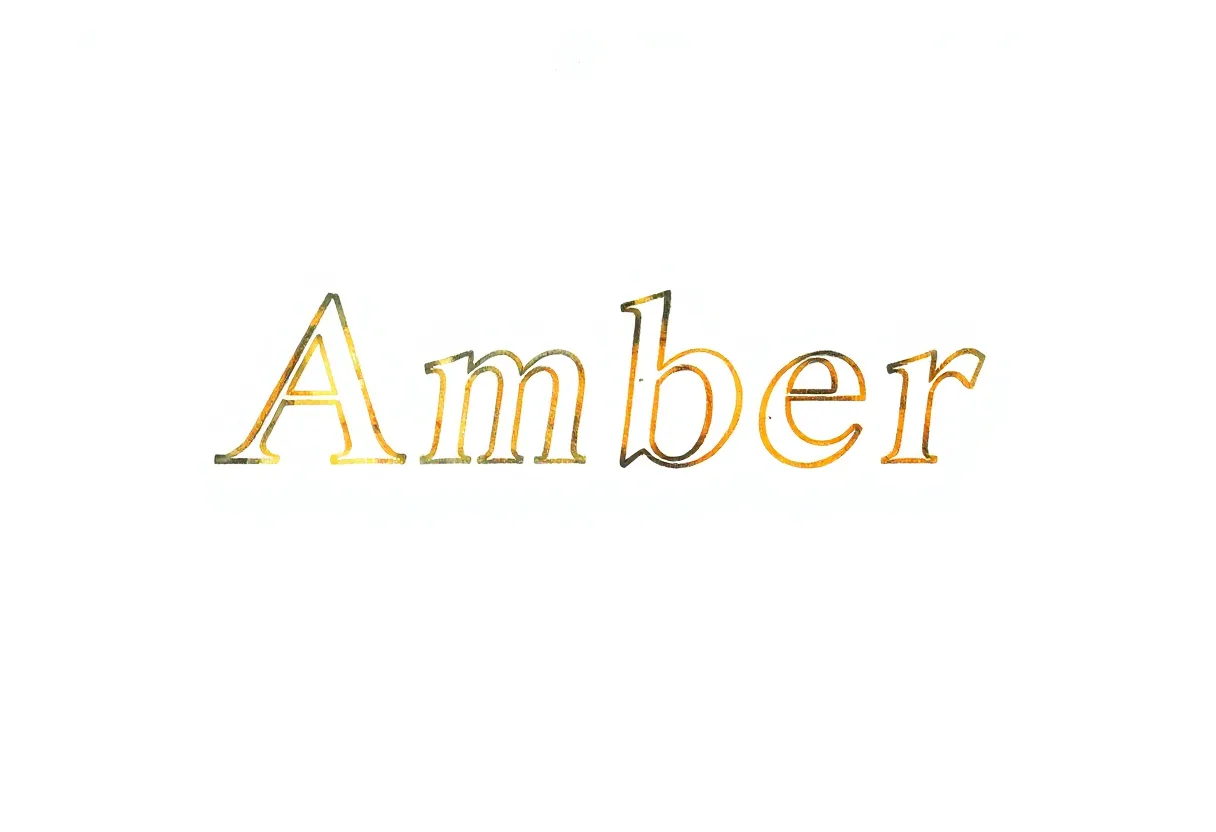
Add text to a plot with a normal font and you’ll be disappointed: each letter comes out hollow and outlined, like a coloring-book heading. The reason — and the fix — is one of the most useful things to understand about plotter typography. The answer is single-line fonts.
Why normal fonts plot hollow
A standard font (the ones on your computer) defines each letter by the outline of its shape. The letter “I” isn’t a single stroke — it’s a thin rectangle, defined by its four edges. When a plotter draws it, it traces that rectangle’s edges, leaving the inside empty. At small sizes this just looks like fuzzy double lines; at large sizes you get obviously hollow letters.
Enter single-line (single-stroke) fonts
Single-line fonts define each character as a set of single strokes — the path a pen would follow to write the letter by hand. The “I” is one vertical line. A plotter draws these exactly as intended: clean, written-looking text with no hollow centers. They’re also far faster to plot, since there’s a fraction of the line length.
Hershey fonts: the classics
The best-known single-line fonts are Hershey fonts, created in the 1960s specifically for vector plotters and displays. They come in several styles (script, sans, serif, gothic) and remain the standard for plotter typography. Because they were designed for exactly this purpose, they plot beautifully.
How to use them
You need a tool that renders text into single-stroke paths:
Inkscape — Hershey Text extension
Inkscape ships with Extensions → Text → Hershey Text. Type your text, pick a Hershey face, and it generates single-line paths ready to plot. The easiest route for most people.
vpype — text plugins
vpype and its plugins can render single-line text directly in your processing pipeline, which is ideal when you’re generating plots programmatically and want labels, captions, or data annotations.
Generative art libraries
In p5.js/Processing, single-line font libraries let you draw stroke-based text in code — perfect for generative typography and data-driven plots.
Tips for clean plotted text
- Choose the right Hershey style for the mood — script for elegance, sans for technical work
- Mind the size — single-line fonts are designed to be legible at a range of sizes, but very small text can still blur; test it
- Optimize with vpype — even text benefits from line merging and reordering
- Pair with your pen weight — a finer pen suits small text; a wider pen gives bold headings real presence
When you’d want it
Any time text meets a plotter: titles on art prints, labels on data visualizations, captions, hand-written-style quotes, maps, and technical drawings. Once you switch from hollow outline fonts to proper single-line fonts, plotted text stops looking like a mistake and starts looking like a feature.
Frequently asked questions
Why does plotted text look hollow or outlined?
Standard fonts are defined by the outline of each letter, so a plotter traces that outline — drawing the edge of every stroke and leaving the middle empty. To plot text as solid-looking strokes you need single-line (single-stroke) fonts.
What are Hershey fonts?
Hershey fonts are classic single-line fonts originally designed for vector plotters and displays. Each character is a set of single strokes rather than filled outlines, so a pen draws them naturally as written text. They're the go-to for plotter typography.
How do I use single-line fonts in my plots?
Use a tool that renders single-line text to paths — Inkscape's Hershey Text extension, vpype's text plugins, or generative-art text libraries. These output single-stroke paths you can plot directly.
Gear mentioned in this post
Antoine Beyeler vpype (Free)
4.9 (480)The command-line Swiss-army knife for pen plotter SVGs — optimizes, reorders, merges, crops and prepares vector files for cleaner, faster plots.
Best for: Everyone — mandatory step between generative art and plotting